Reconfigure an Existing Installation
Use this guide if OpenClaw is already installed and you want to switch to Entrim as your model provider.
Prerequisites
To follow this guide, you need:
- An Entrim account
- An Entrim API key
- An active model plan subscription
- A computer with terminal access (macOS, Linux, or Windows with WSL)
1. Run Configure Command
Run the configure command in your terminal:
openclaw configure
2. Gateway
When prompted Where will the gateway run select "Local (this machine)"
🦞 OpenClaw 2026.5.20 — I read logs so you can keep pretending you don't have to.

┌  OpenClaw configure
│
◇  Existing config detected ────────────────────────╮
│                                                   │
│  Workspace: ~/.openclaw/workspace                 │
│  Model: custom-api-entrim-ai/Qwen/Qwen3.8-27B     │
│  Gateway: local via loopback on :18789            │
│                                                   │
├───────────────────────────────────────────────────╯
│
◇  Where will the Gateway run?
│  Local (this machine)
3. Model configure
When prompted What do you want to configure select Model
◇  What do you want to configure?
│  ○ Workspace
│  ○ Model
│  ○ Web tools
│  ○ Gateway
│  ○ Deamon
│  ○ Channels
│  ○ Plugins
│  ○ Skulls
│  ○ Health check
│  ○ Skip for now
4. Auth provider
When prompted Model/auth provider first select More... and then Custom provider
◇  Model/auth provider
│  ○ OpenAI
│  ○ Antropic
│  ○ xAI (Grok)
│  ○ Google
│  ○ Custom Provider
│  ○ Google Vertex
│  ○ Hugging Face
5. API Endpoint
When prompted API Base URL enter https://api.entrim.ai/v1.
◇  API Base URL
│  https://api.entrim.ai/v1
6. API Key
When prompted How do you want to provide this API key select Paste API key now
◇  How do you want to provide this API key?
│  ○ Paste API key now
│  ○ Use external secret provider
then paste your API key. You can find your API key in the Entrim Dashboard under API Keys.
◇  API Key (leave blank if not required)
│
7. Compatibility
When prompted Endpoint compatibility select OpenAI-compatible
◇  How do you want to provide this API key?
│  ○ OpenAI-compatible
│  ○ Anthropic-compatible
│  ○ Unknown (detect automatically)
8. Model name
When prompted to choose a model, copy the model name from the plan you subscribe to in the Entrim Dashboard under Plans.
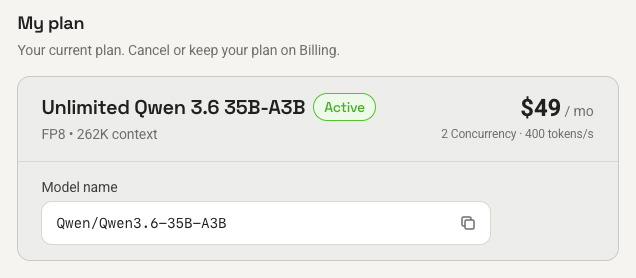
◇  Model ID
│  Qwen/Qwen3.8-27B
9. Endpoint name
When prompted Endpoint ID you preferred entrim-ai or anything you like.
◇  Endpoint ID
│  entrim-ai
10. Optional
Model alias (optional)
You can enter Model alias or leave it blank